





Instagram, one of the most-used social networks in the retail industry, allows users to edit and share photos and videos. Due to its visual nature and high user engagement rate, Instagram is a valuable social media marketing platform that benefits retail brands. how to sell on Instagram to level up your business.
💡 Need the Instagram basics? Make sure to check out your guide to Instagram for retail businesses for everything you need to get started.
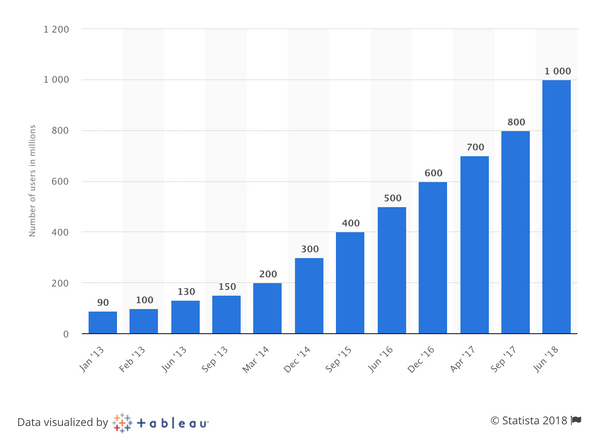
According to TechCrunch, Instagram hit 1 billion monthly active users in June 2018. In September 2025, Meta CEO Mark Zuckerberg said Instagram had grown to 3 billion monthly active users, as reported by Reuters.
Instagram is widely considered a high-engagement channel for many brands compared to other social networks, though engagement rates vary widely by industry, content format, and account size.
Instagram's success has fueled the development of apps that help businesses automate and schedule Instagram content to help schedule content and manage publishing workflows. Use only tools and tactics that comply with Instagram’s policies to avoid account restrictions. Retail merchants no longer have to rely solely on their phone to plan and publish Instagram posts. Social media automation tools are desktop friendly, and most of them allow you to preview your grid. Automation tools help you plan your Instagram feed so it's aesthetically on brand.
These social media tools help retailers streamline bulk content creation and planning so you can focus on building your business while your feed is partially on autopilot. Planning ahead also gives you time to perfect the copy that supports each image you share. It's easier to create your social media posts weeks or months in advance with these social media scheduling tools.
In addition to Instagram scheduling apps, there are also apps that offer strategic solutions for organic Instagram growth. Growth tools can help you research hashtags, locations, and audiences so you can find relevant accounts and conversations to engage with.
Here, we'll look at some of the best social media productivity tools that retailers can use to plan and automate your feed, increase your following, and track time spent on Instagram to help you grow your business.
Tools are important at every stage of business management. Take a look at some of the best prototyping tools.
Automate Your Instagram Scheduling and Growth With These Apps
Later
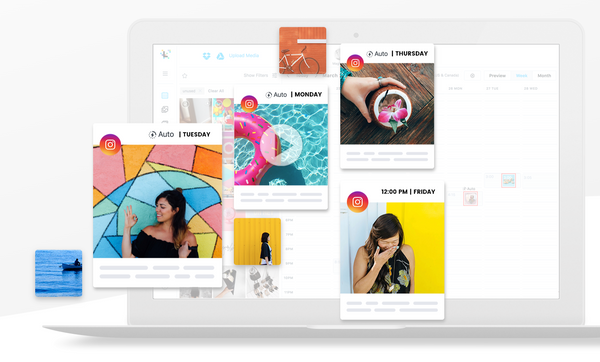
Later believes that social media has become a visual experience and has designed their platform to help companies plan and schedule their photo and video content. The tool’s automatic Instagram posting feature is a lifesaver that allows retailers to “set it and forget it” when creating and posting Instagram content. You can also schedule times throughout the day or week to check your Instagram account and engage with your following.
Later is a member of the Instagram Partner Program. Later also enables retailers to schedule content on Facebook, Twitter, and Pinterest so you can create and automate your social posts from one place.
The preview feature allows you to focus on visual scheduling first and then you can create the copy to accompany each image. You can upload your graphic content directly to the Later app and, depending on the monthly plan that you choose, you can access a robust analytics dashboard to learn from your data and implement new strategies as you move forward.
Planoly
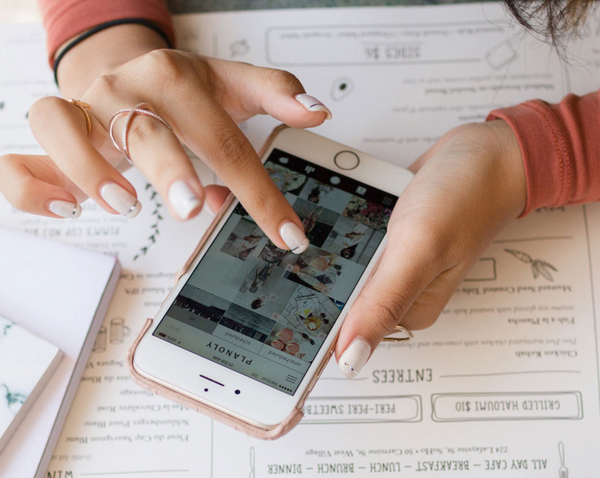
An ecommerce founder who needed a solution for sharing content on Instagram for her jewelry brand created her own tool: Planoly. Planoly is simple, clean, and easy to use with thoughtful touches and a beautiful user interface.
Just like Later, you can schedule automatic Instagram posts with Planoly. Planoly also supports scheduling beyond Instagram (for example, Facebook auto-posting is available in Planoly’s Multi-Channel Workspace), as described in Planoly’s help documentation.

Hootsuite
Hootsuite allows you to manage all of your social media channels in one place. You can create search streams by hashtag, geographic location, or keyword to help you curate content and engage with relevant followers. The Hootlet Extension allows you to instantly post or schedule compelling content from any webpage as you surf without having to log into your social accounts. You can also access content that you've curated and stored in your cloud file services, like Google Drive or Dropbox.
If you have a larger team, you can ensure only approved content gets published on your social media channels. Hootsuite allows you to designate team leaders to approve outgoing content, so your company’s social media posts stay on brand (and scandal-free).
3 Ways to Grow Your Instagram Following Organically
Combin
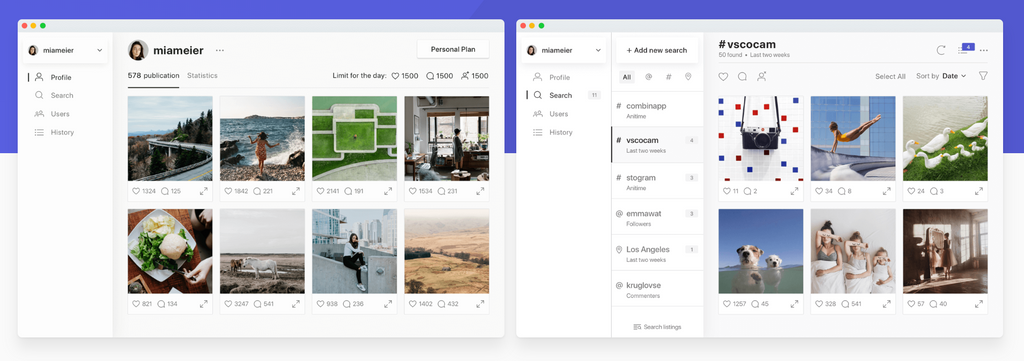
Combin can help you organize your Instagram outreach by making it easier to find accounts and posts related to specific hashtags and locations. After downloading the app, use the search feature to find people with relevant hashtags and locations, then engage thoughtfully with content that’s genuinely relevant to your brand.
Instead of relying on bulk follow/unfollow tactics (which can lead to a poor experience for users and may increase the risk of account restrictions), focus on compliant, sustainable growth: publish consistently, use clear calls to action, reply to comments and DMs, collaborate with creators or complementary brands, and use Instagram’s native features (like Stories, Reels, and Collabs) to reach new audiences.
Sprout Social
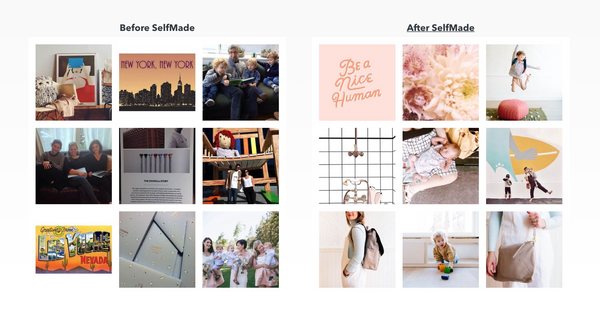
Sprout Social is a social media management platform that helps brands plan content, schedule posts, manage engagement, and report on performance across channels (including Instagram). It’s a good option for retailers who want a more structured workflow for publishing and community management, especially when multiple people need to collaborate and approve content.
With Sprout Social, you can build a publishing calendar, route posts for approval, monitor messages and comments in a unified inbox, and use reporting to understand what content is driving reach and engagement—so you can iterate on what’s working.
Link to More Than One URL in Your Instagram Bio
You can include more than one link in your Instagram bio for marketing campaigns and drive traffic to specific product pages, blog posts, and landing pages on your website.
For example, if you're launching a new product, you can create one link that goes directly to that product but still keep the URL for your about page, homepage, or newsletter signup in place in your bio.
Being able to list more than one link in your Instagram bio can also make content planning more productive. Rather than changing out your Instagram bio link every day (depending on the content you publish), you can organize your links by week to make sure the appropriate content is visible for your customers and followers.
When you plan your social media schedule for the month or week, you can use a third-party app or create your own "links" page. This feature is essentially a landing page that includes various call-to-action (CTA) buttons. Retailers can use strategic CTAs to generate leads and direct your followers through a specific customer journey.
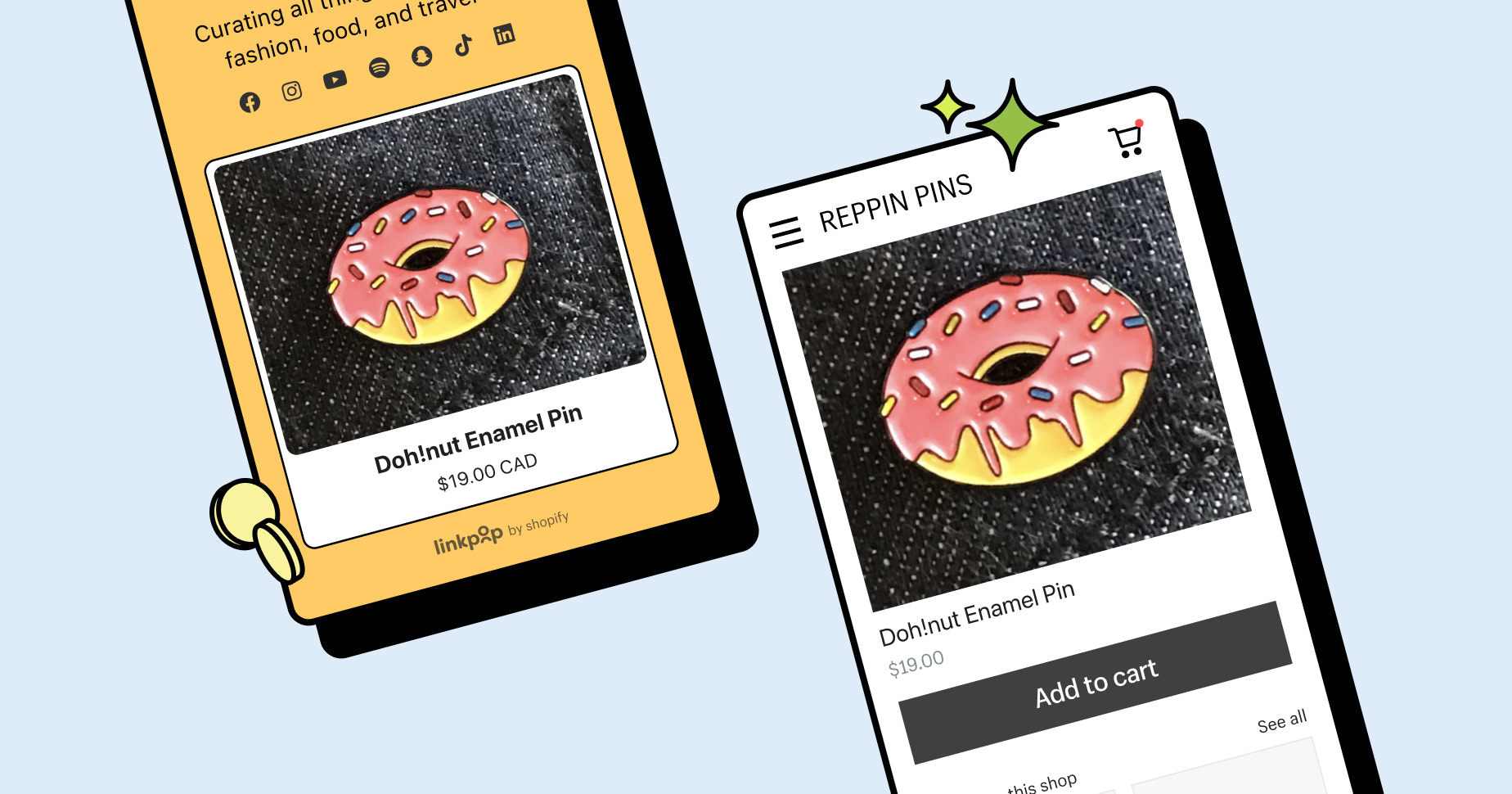
Use an app like Linkpop to optimize your Instagram traffic with more than one link in your bio. You'll still have one primary bio link, but the app allows you to add numerous CTA buttons within that primary link versus just one destination.
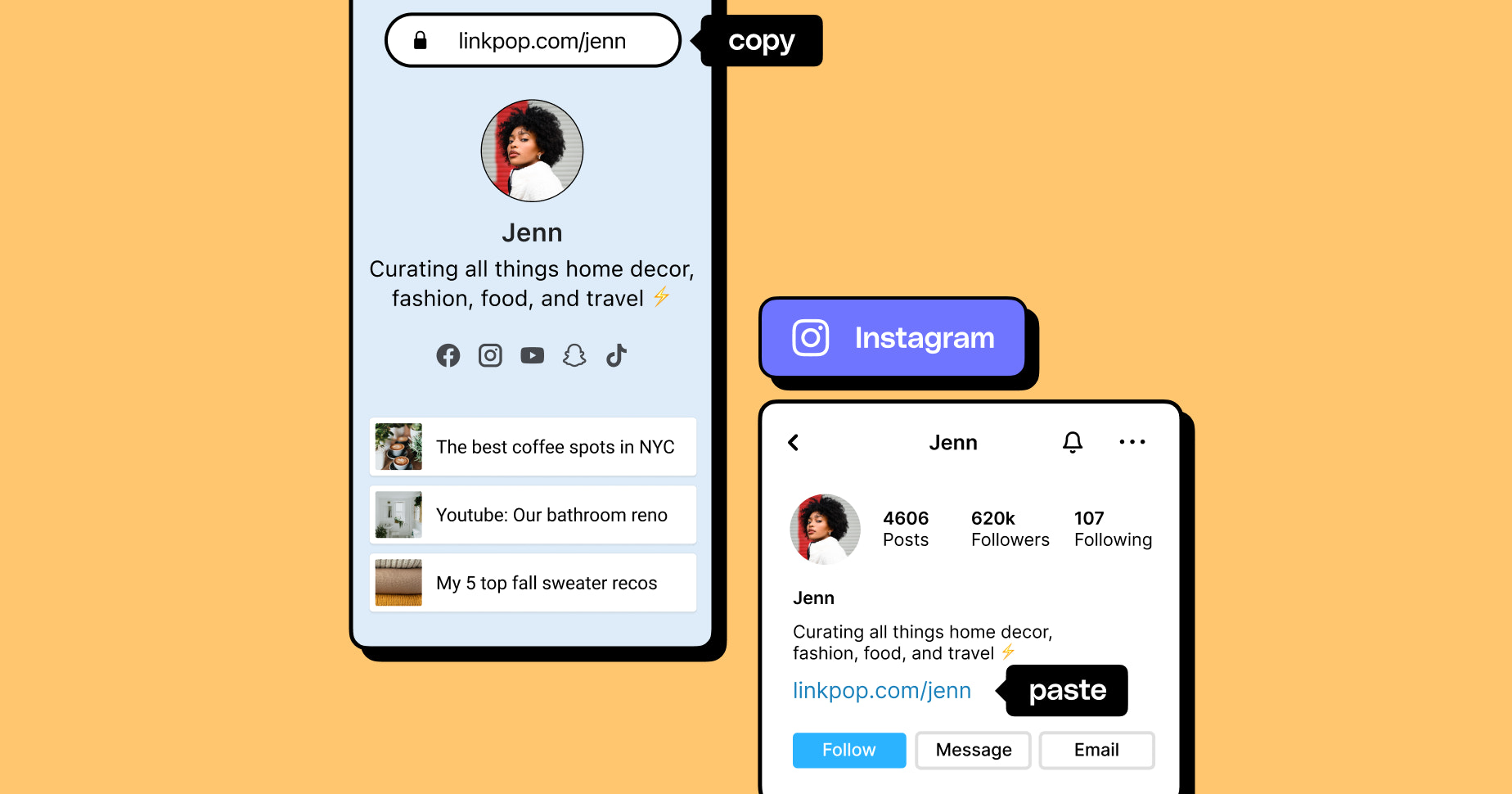
When possible, it’s a good idea to send visitors to your website instead of to a third-party app. By directing Instagram followers to your site, you’ll increase your website traffic and collect data that can be used later for retargeting.
Track the Time You Spend on Instagram
It's no secret: Getting lost in the Instagram rabbit hole is a challenge that many social media managers, small business owners, and individuals face. To avoid spending endless hours lost in your feed, schedule specific times each day or week that you check your Instagram account and engage with your audience.
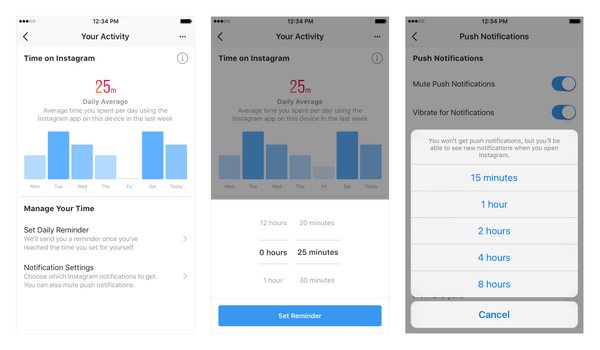
Instagram introduced its “Your Activity” time-tracking tools in 2018, which let you view your daily average time in the app, set reminders, and adjust notification controls. For background, see MacRumors.
Not only can you see how much time you spend in the app, but the tool allows you to set a time-spent daily limit and get a reminder once you exceed that. There’s also a shortcut to manage Instagram’s notifications, so the app is less interruptive.
Moving Forward With Social Media Tools For Productivity
Now that you have a better understanding of a few of the top social media tools available, it's a good idea to compare each solution and decide which option works best for your business. You don't need to automate all of your social media channels at once. Start with Instagram, and once the process is running smoothly, you can move onto the next social network.
Read more
- Content Marketing for Retailers: How to Build an Audience Online
- Product Branding: How to Give Products an Identity
- What Retailers Need to Know About Voice Shopping
- 4 Easy Ways to Get Better Reviews on Your Google Places Page
- Affiliate Programs for Retailers: What Are They and How They Can Boost Your Revenue
- Retailers Who Are Nailing Facebook Live (And How You Can Too)
- How to Set Up and Optimize Your Google Business Profile
- The Art of the Drop: How Retailers Flash Sales Use Hype to Move Product (and Fast)
- Shopping Tourism: Why Retailers Should Care (+ Tactics to Leverage this Trend)
Instagram tools for retail FAQ
How do retail businesses use Instagram?
- Showcase Products: Retail businesses can use Instagram to showcase their products, either in a single post or through multiple posts in a carousel. They can use high-quality product photos and videos to show off the latest arrivals or their most popular items.
- Offer Exclusive Deals: Retailers can use Instagram to offer exclusive deals to their followers. This could be in the form of a discount code, a limited-time offer, or a giveaway.
- Promote Events: Retailers can use Instagram to promote events, such as store openings, sales, or product launches. They can use Instagram Stories to create a countdown to the event and post photos and videos of the event as it’s happening.
- Provide Customer Service: Retailers can use Instagram to provide customer service. They can respond to customer inquiries, answer questions, and provide product information.
- Create User-Generated Content: Retailers can use Instagram to create user-generated content. They can ask their followers to post photos and videos of themselves using their products and tag the business, which can help to increase engagement and brand awareness.
What are Instagram business tools?
- Instagram Insights: A powerful analytics tool that provides insights into how your posts and stories are performing, as well as who is engaging with your content.
- Ads Manager: A powerful tool for creating and managing Instagram ad campaigns.
- Shopping on Instagram: A feature that allows businesses to tag products in their posts, making it easy for customers to shop directly from their feeds.
- Creator Studio: A platform that provides insights into how your content is performing across all of your channels.
- Instagram Stories: A feature that allows businesses to share content with their followers in a more interactive way.
- IGTV: A feature that allows businesses to share longer-form videos with their followers.
- Instagram Live: A feature that allows businesses to interact with their followers in real-time.
- Facebook Pixel: A powerful tool for tracking user engagement with your content and measuring the success of your ads.
Which Instagram tool is best?
What are Instagram tools?
- Later
- Planoly
- Hootsuite
- Combin
- Sprout Social
- Linkpop


